30-Second Summary:
- Learn whether one backpack or two bags is better for carrying two laptops based on comfort, travel, and organization needs
- Compare benefits of dedicated two-laptop backpacks and wheeled options for heavy loads
- Discover practical tips and Everki solutions designed for safe, organized, and efficient dual-laptop carry
Carrying one laptop used to be enough a few years back. Today, many professionals carry two. One for work, another for personal tasks. Some use different devices for testing, presentations, or remote collaboration. While this setup improves productivity, it also creates a new challenge: how do you carry both laptops comfortably and safely?
Should you use one backpack to keep everything organized, or carry two separate bags to divide the weight? The wrong choice can lead to discomfort, clutter, and even device damage. That is why many professionals look for the best backpack for carrying two laptops that offers protection, organization, and travel convenience.
This guide explores both options and helps you choose the most practical setup for your daily routine and travel needs.
Why Professionals Carry Two Laptops
Before choosing the right setup, it helps to understand why many professionals carry multiple laptops.
There are several common reasons:
- Work and personal laptop separation
- Different operating systems for development and testing
- Client device and personal device
- Travel laptop and office laptop
- High-performance workstation plus lightweight device
While carrying two laptops offers flexibility and productivity, it also introduces challenges such as weight distribution, protection, and accessibility.
That is why selecting the right solution becomes essential.
One Backpack vs Two Bags: What’s the Difference?
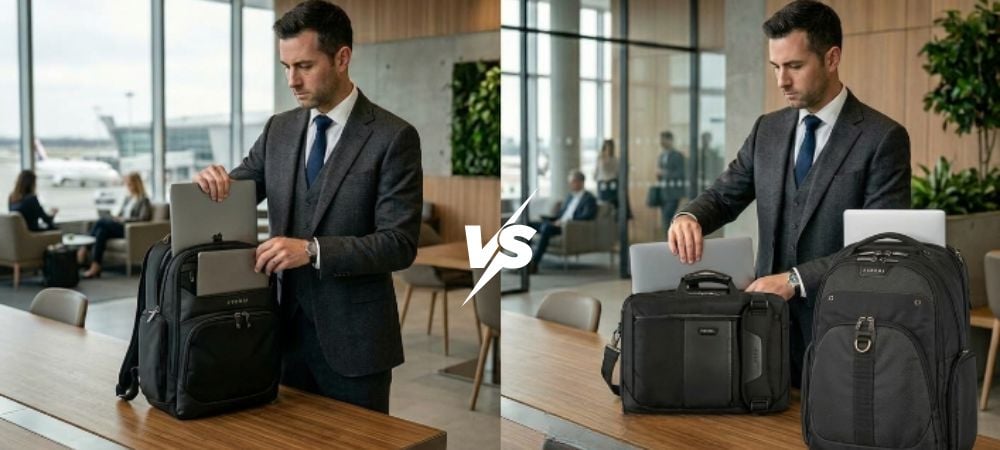
There are two main approaches professionals use:
One Backpack Solution
Using a dedicated two laptop backpack allows you to carry both devices in one organized space. This option offers simplicity, comfort, and streamlined mobility.
Two Bags Solution
Some professionals prefer separating devices into two laptop bags. One might carry essential work items while the other holds secondary devices.
Both options have benefits. The best choice depends on your daily routine and travel habits.
Benefits of Using One Backpack for Two Laptops
Using one backpack designed for multiple devices offers several advantages.
1. Better Weight Distribution
Carrying one backpack distributes weight evenly across your shoulders and back. This reduces strain and improves comfort during long commutes or travel days.
2. Improved Organization
Modern laptop backpacks offer dedicated compartments, cable organizers, and accessory pockets. This makes it easier to keep everything in one place without confusion.
3. Enhanced Security
Keeping both devices in one bag reduces the risk of forgetting or losing a second bag. It also allows you to monitor your belongings more easily in crowded environments.
4. Easier Travel Experience
When navigating airports, trains, or crowded streets, managing one bag is always simpler than juggling two separate ones.
5. Professional Appearance
A single well-designed backpack provides a cleaner and more professional look, especially for business meetings and client visits.
When Two Bags Might Be a Better Option
While one backpack is often ideal, there are situations where two bags make sense.
1. Different Usage Needs
If one laptop is used rarely, keeping it in a separate bag can help reduce daily weight.
2. Security Requirements
Some professionals prefer separating devices to minimize risk if one bag is lost or stolen.
3. Flexible Work Environments
If you frequently leave one device at the office or hotel, two bags offer more flexibility.
4. Short vs Long Commutes
For short trips, carrying one bag might be easier. For longer journeys, separating weight between two bags can sometimes feel more comfortable.
Factors to Consider Before Choosing
Before deciding, consider the following factors:
Weight
Two laptops can be heavy. Choose a solution that reduces strain and offers ergonomic support.
Protection
Your laptops need padded compartments and secure sleeves to prevent damage.
Accessibility
You should be able to access both devices quickly without unpacking everything.
Organization
Look for compartments for chargers, accessories, and documents.
Travel-Friendly Features
Features like trolley straps, wheeled options, and adjustable compartments improve convenience.
Best One-Bag Setup for Carrying Two Laptops
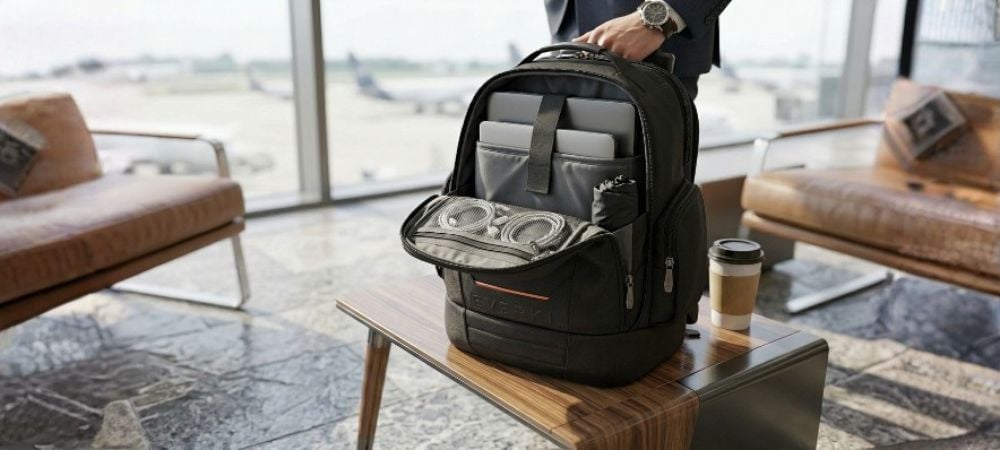
If you prefer the simplicity of one bag, a purpose-built backpack is the best choice. A well-designed solution can transform how you travel and work.
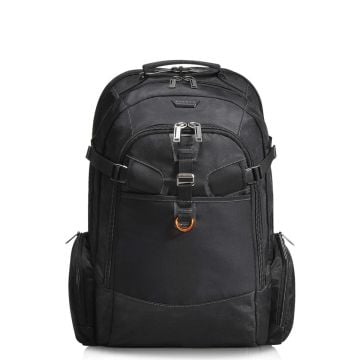
Business 120 PRO: Built for Two Laptops
The Business 120 PRO is designed specifically for professionals who rely on multiple devices.
Travel Friendly 2 Laptop Backpack, up to 18.4-Inch
This backpack is built for professionals who demand organization, protection, and travel convenience.
Key Features:
- Holds 2 Laptops: Fits a 18.4" + 16"
- Travel-Friendly: Trolley strap and separate laptop compartment
- Fully Equipped: Includes rain cover and mesh cable pouch
The Business 120 PRO offers dedicated compartments that keep both laptops secure and accessible. Its smart layout reduces clutter and ensures your accessories remain organized.
This makes it an excellent choice for professionals who want one streamlined solution without compromising protection.
Best Hybrid Setup: Wheeled Backpack for Heavy Loads
If weight is your main concern, a wheeled backpack provides the perfect balance between mobility and comfort.
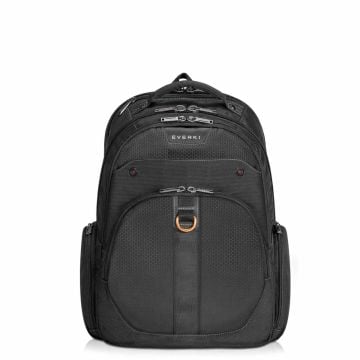
Atlas Wheeled 2; Mobile Office Convenience
The Atlas Wheeled 2 is designed for professionals who travel frequently and need flexibility.
Wheeled Laptop Backpack, 13-Inch to 17.3-Inch Adaptable Compartment
Key Features:
- Adjustable Laptop Compartment: Fits laptops from 13" to 17.3"
- Travel-Friendly: Stowable handle and shoulder straps
- Mobile Office: Smart compartment layout for perfect organization
This design allows you to roll the bag when needed or carry it as a backpack. It is especially useful in airports, conferences, and long commutes.
Stylish and Functional Option
Atlas Wheeled 2 Grey; Professional and Practical
For professionals who prefer a modern aesthetic, the Atlas Wheeled 2 Grey offers the same functionality with a sleek appearance.
Wheeled Laptop Backpack Grey, 13-Inch to 17.3-Inch Adaptable Compartment
Key Features:
- Adjustable Laptop Compartment: Fits laptops from 13" to 17.3"
- Travel-Friendly: Stowable handle and shoulder straps
- Mobile Office: Smart compartment layout for perfect organization
This option works well for professionals who want both style and functionality in one solution.
One Backpack vs Two Bags Comparison
| Feature | One Backpack | Two Bags |
| Comfort | Better weight distribution | Split load |
| Organization | Single organized system | Multiple compartments |
| Security | Easier to monitor | Separate risk |
| Travel Convenience | Easier mobility | More items to manage |
| Professional Look | Clean and minimal | Less streamlined |
For most professionals, one backpack offers better convenience and organization.
Making the Final Decision
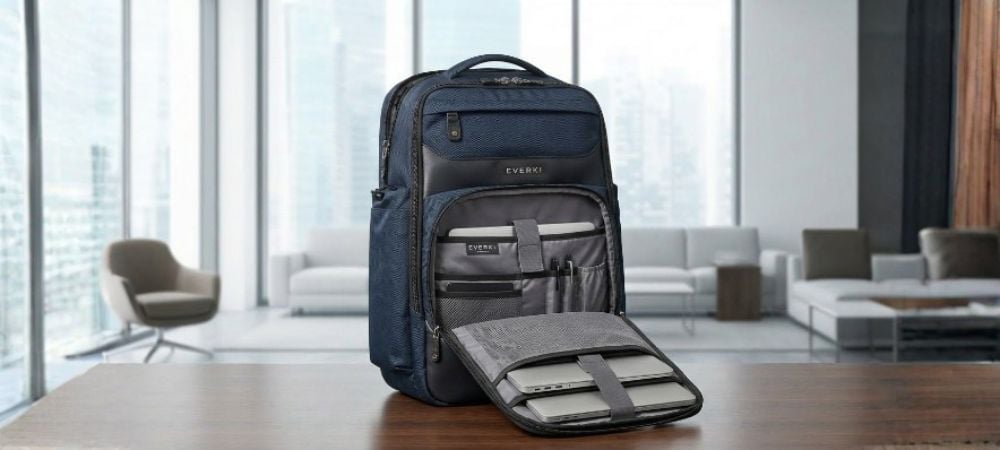
Choosing between one backpack and two bags ultimately depends on your workflow and travel habits.
If you want simplicity, comfort, and professional organization, a dedicated backpack is often the best choice. If flexibility and weight distribution matter more, two bags may work better.
However, for most professionals, a purpose-built solution designed specifically for carrying two laptops offers the best balance of comfort, protection, and convenience.
The right setup not only protects your devices but also improves productivity and mobility.
If you are searching for the best backpack for carrying two laptops, consider your daily routine, travel frequency, and organization needs. A well-designed solution can make a significant difference in your workday.
Conclusion
Carrying two laptops is now common for modern professionals, but choosing the right setup matters more than ever. One backpack provides streamlined organization, improved comfort, and easier travel, while two bags offer flexibility and weight distribution for specific situations.
For professionals who want a reliable and efficient solution, purpose-built designs like Business 120 PRO and Atlas Wheeled 2 deliver the perfect balance of mobility, organization, and protection. These thoughtfully designed options help you carry your devices confidently, whether you are commuting, traveling, or working on the go.
Ready to upgrade your everyday carry? Explore Everki’s collection and shop the best quality laptop backpacks designed for durability, smart organization, and professional performance. Invest in the right setup and stay productive wherever your work takes you.
FAQs
1. Is it safe to carry two laptops in one backpack?
Yes, it is safe to carry two laptops in one backpack if the bag is designed with dedicated padded compartments. A purpose-built backpack helps protect both devices from impact, scratches, and pressure while keeping them securely separated.
2. What should I look for in a backpack for carrying two laptops?
Look for features like dual laptop compartments, padded sleeves, ergonomic shoulder straps, durable materials, and smart organization pockets. Travel-friendly features such as a trolley strap or wheeled option can also improve convenience.
3. Is carrying two laptops bad for your back?
Carrying two laptops can add extra weight, but choosing a well-designed backpack with proper weight distribution and padded straps can reduce strain. Wheeled backpacks are also a great option for minimizing pressure during long commutes or travel.
4. Should I carry two laptops in one bag or two separate bags?
It depends on your needs. One backpack offers better organization and convenience, while two bags provide flexibility and weight distribution. Professionals who travel frequently often prefer a single backpack designed for multiple devices.
5. Are wheeled laptop backpacks better for carrying two laptops?
Wheeled laptop backpacks are ideal for professionals who carry heavy loads or travel often. They allow you to roll the bag when needed and switch to backpack mode when navigating stairs or crowded areas.